CS2 Web Radar Hack — Live Enemy Radar in Your Browser
Turn any browser into a live Counter-Strike 2 radar. Real-time player positions, health, armour, weapons, money, bomb status and viewer count — all on an interactive map you can open on a second monitor, tablet, laptop or phone. Share the radar URL with friends. No second PC required. Undetected external overlay.
What Is a CS2 Web Radar?
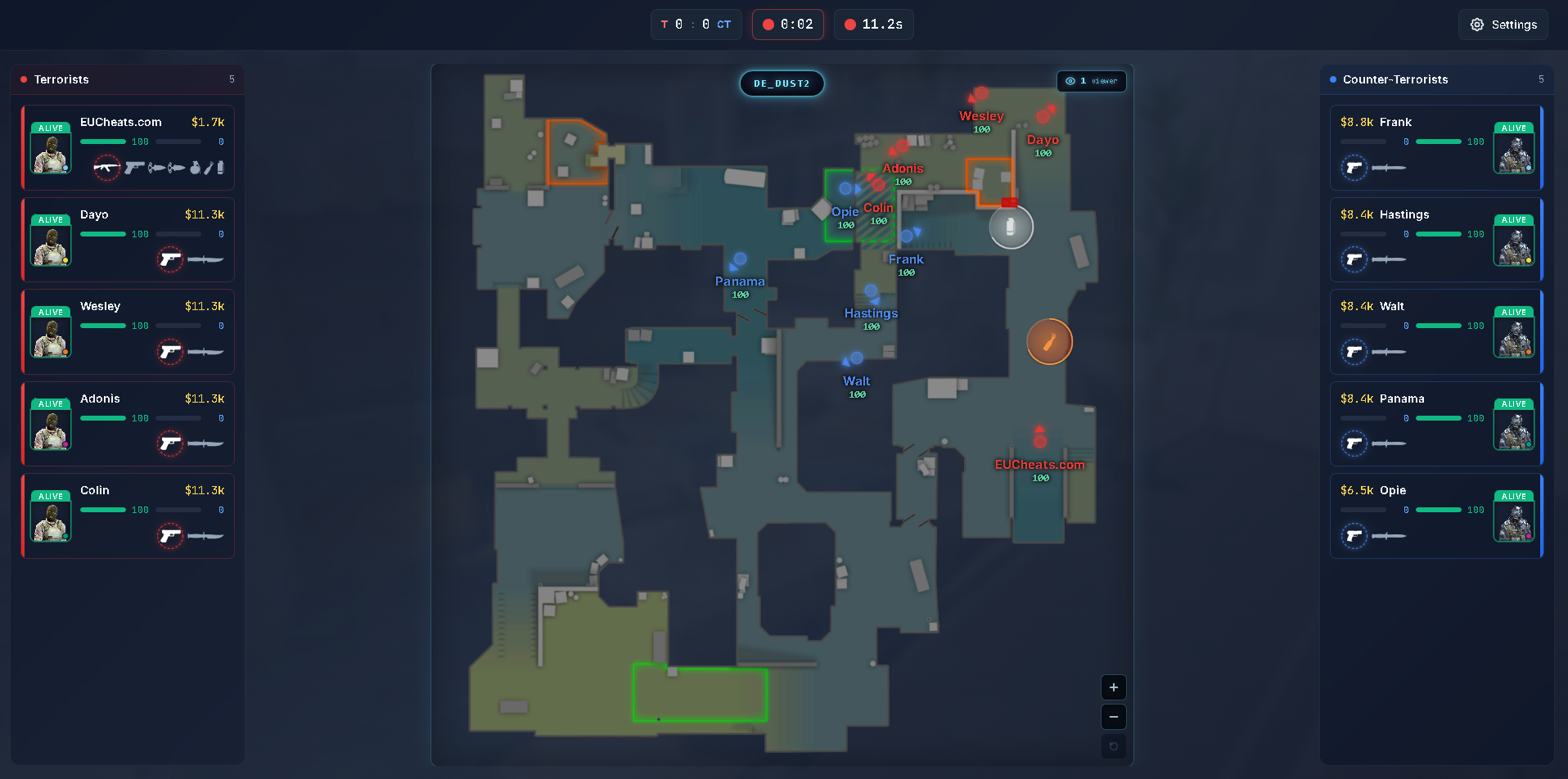
A browser-based live radar that mirrors your Counter-Strike 2 match — outside the game.
A CS2 Web Radar is a browser-based radar that streams live data from your Counter-Strike 2 match directly into a web page. Instead of drawing an overlay inside the game, the radar runs entirely in your browser — on a second monitor, phone, tablet or laptop — while you play normally on your main PC.
The EUcheats Web Radar streams real-time player positions, health, armour, weapons, money, bomb status, smokes, molotovs, dropped weapons, dropped C4 and viewer count. Zoom, pan and follow your own player — all from the browser.
The most powerful feature is URL sharing: send your radar link to a teammate or friend and they can watch the same match live from their own device. No install, no injection, nothing to download for them.
Why CS2 Web Radar Beats a Traditional In-Game Radar
The same live intel as an in-game radar hack — but delivered in a browser, with sharing built in.
🖥 In-Game Radar Overlay
Drawn directly on top of CS2 using an internal or external overlay. Everything happens on the gaming PC.
- Live player positions on screen
- Health, weapons, bomb status
- Overlay only visible to you
- Takes up screen space
- Cannot be shared or viewed on a second device
- Some variants require injection (higher ban risk)
- No viewer count for friends
🌐 EUcheats CS2 Web Radar
Live radar in your browser. Same data as an in-game overlay — plus everything an overlay cannot do.
- Live player positions in any browser
- Health, armour, weapons, money, bomb status
- Smokes, molotovs, dropped weapons, dropped C4
- Zoom, pan, follow your own player
- Viewer count badge — see who else is watching
- Share the radar URL with friends
- Works on phone, tablet, laptop, second PC
- External — no injection required
- Also renders as an optional in-game overlay
CS2 Web Radar Features
Everything you get out of the box — free tier included.
Real-Time Player Positions
Enemies and teammates stream live on the map, updating every 33 ms by default. Adjustable refresh rate up to 500 ms.
Player Names
See each player's name directly on the radar for instant identification. Toggle on/off with a single click.
Health & Armour
Live health and armour values for every player. Identify weak targets and know who is fully equipped.
Current Weapons
The exact weapon each player is carrying — primary, secondary, knife, utilities — with the active weapon highlighted.
Player Money
Track economy round by round. Know who can force-buy and who has to eco before the next round even starts.
Bomb Status
See who is carrying the C4, when it's been dropped, and where it's planted — with a live countdown ring.
Smokes & Molotovs
Active smoke and molotov zones drawn with countdown rings so you know exactly how long they have left.
Dropped Weapons
Every dropped weapon on the map with the correct icon. Know what's available to pick up at a glance.
Alive & Dead Status
Dead players dim on the radar, so you always know exactly who's still in the round without checking the scoreboard.
Movement & Direction Arrows
Every player marker has an orbiting arrow showing current yaw. You see where players are looking, not just where they are.
Viewer Count
A live badge shows how many people are viewing your radar. Perfect for team coordination and streaming.
Share Your Radar URL
Send your radar link to a friend. They open it in a browser — no download, no injection, no install on their end.
Zoom, Pan, Follow Player
Ctrl+Scroll to zoom, Ctrl+Drag to pan, and toggle follow-mode to keep your own player centered automatically.
Works on Any Modern Browser
Chrome, Firefox, Edge, Safari — on desktop, laptop, tablet or phone. Same live radar everywhere.
Multi-Level Map Support
Nuke, Vertigo, Train — the radar correctly handles multi-level maps with clean vertical distinction.
No FPS Impact
The radar runs in your browser, not inside CS2. Zero impact on your FPS, stutters or input latency.
Customizable Settings
Player dot size, bomb marker size, weapon icon size, portrait mode, radar effects, and everything else — all adjustable live.
Scoreboard & Round Timer
Live score, current round time and freeze time all shown in the radar header. No alt-tab needed.
What's Included: Web Radar vs In-Game Overlay
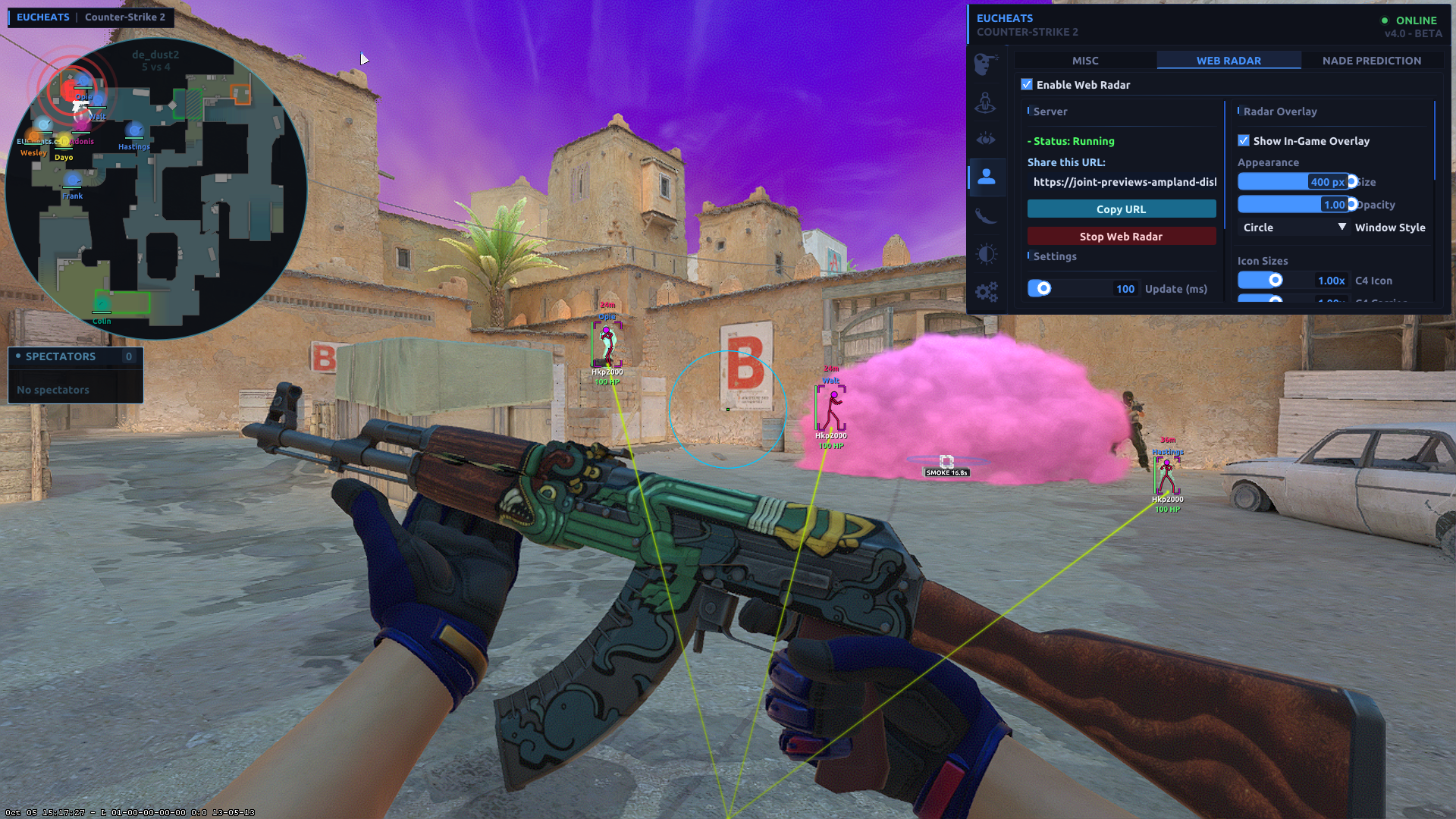
You get both. The web radar runs in the browser, and the same data can also be shown as an optional in-game overlay.
🌐 Web Radar (Browser)
- Open in any browser — Chrome, Firefox, Edge, Safari
- Any device — phone, tablet, laptop, second PC
- Share via public URL — a secure tunnel exposes the radar to friends
- Viewer count — see how many people are watching
- Zoom / Pan / Follow — full map interaction
- Custom player portraits — agent model, Steam avatar, or cycling
- Adjustable refresh rate — 33 ms to 500 ms
- Zero FPS impact — nothing runs inside CS2
The web radar runs through a local server + secure tunnel. Friends just open the URL — nothing to download on their side.
🖥 In-Game Overlay (Optional)
- Same data — one source, one truth, always in sync
- Box or circle shape — pick the style you prefer
- Draggable — move it wherever you want on screen
- Adjustable size — 180 px to 400 px
- Adjustable opacity — 0.30 to 1.00
- Icon size sliders — C4, carrier, weapons, names
- Content toggles — smokes, molotovs, C4, dropped weapons, names, health bars
- Follow player mode — auto-centered with smoothing
The overlay uses the same JSON snapshot as the browser. If you turn off the web radar, the overlay still works — and vice versa.
Use Your Radar on Any Browser or Device
One radar link. Every device you own.
Mobile Phone
Open your CS2 Web Radar on your phone and keep live match information beside you — without taking up any space on your main screen.
Tablet
Use a tablet as a dedicated radar display. Large, clear, and always visible while you play.
Desktop & Laptop
Open the radar on a second PC, laptop, or a second monitor for a full-size view that stays separate from CS2.
How to Download & Set Up the CS2 Web Radar
From download to live radar in under five minutes.
Download the Radar
Grab the latest Web Radar client from the download page. It's a small Windows executable — no separate installers needed.
Launch Counter-Strike 2
Start CS2 as normal and join the match you want to use the radar with — Premier, Competitive or Casual.
Open the Radar Menu
In the cheat menu, go to Misc → Web Radar and click Launch Web Radar. Everything else is automatic.
Wait for Setup
The launcher downloads Node.js, the radar client, and Cloudflared the first time you run it. A progress bar shows every step.
Copy Your Radar URL
When the tunnel is ready, the menu shows a public radar link. Click Copy URL to grab it.
Open It in a Browser
Paste the link into any browser on your phone, tablet, laptop or second PC. The live radar appears instantly.
Share With Friends
Send the link to a friend. They open it in their browser — no download, no injection, no client needed on their end.
Customize Live
Open the settings panel in the browser to adjust dot size, icon sizes, portrait mode, and every other visual option on the fly.
Gallery
Real screenshots of the CS2 Web Radar and in-game overlay in action.
Frequently Asked Questions
Everything players ask before downloading the CS2 Web Radar.
Yes. The EUcheats CS2 Web Radar is currently undetected. The radar client is external — it does not inject into CS2 — and all visual output happens in your browser. As with any cheat, no provider can guarantee it will stay undetected forever, but our update cadence keeps the client current with every CS2 patch.
The radar client itself is external — it reads game memory without injecting into the CS2 process, which removes the main detection surface used against internal cheats. Simply viewing a shared radar link in your browser carries no ban risk at all, since it requires no client on the viewer's device. Always use a secondary account for maximum safety, as with any cheat.
Yes. The EUcheats CS2 Web Radar works with Premier, Competitive, Wingman and Casual matches on official Counter-Strike 2 servers. It is not currently supported on FACEIT, ESEA, or third-party leagues with kernel-level anti-cheats.
Yes. Once the radar is running, open the radar URL in any modern browser on your phone, tablet, laptop or second PC. The interface is fully responsive and automatically switches between a phone layout, tablet layout and desktop layout depending on your screen size.
No. A second PC is not required. You can open the radar on a second monitor, phone, tablet or laptop while playing Counter-Strike 2 on your main PC. The radar client runs alongside CS2 on your gaming PC — the browser is simply where the radar is displayed.
Yes — this is one of the core features. Your radar is exposed through a secure public URL. Send that link to a friend and they can watch the same live match from their own browser. The radar header also shows a viewer count, so you always know how many people are watching.
No. Friends viewing your shared radar do not need to download or install anything. They open the URL in a supported browser — Chrome, Firefox, Edge, Safari — and the radar loads instantly. This makes sharing ideal for coaching, team coordination, and streams.
The radar supports every official Counter-Strike 2 map including Mirage, Dust II, Inferno, Nuke, Ancient, Anubis, Vertigo, Overpass, Train and Office. Multi-level maps such as Nuke and Vertigo are handled with correct vertical distinction between floors.
No. The radar runs entirely in your browser, not inside CS2. That means zero impact on FPS, stutters, or input latency. The only CPU cost is the lightweight external client reading memory — a small fraction of a single core.
The radar is designed to update automatically when required. If a CS2 update introduces offsets that require a client change, we aim to release an updated version within hours. Premium users are notified automatically as soon as a new build is available.
No. The CS2 Web Radar is included with the EUcheats Premium CS2 Cheat at €7.95/month — there is no separate purchase and no extra cost. If you're already a Premium subscriber, you can launch the Web Radar directly from the Misc → Web Radar tab in the cheat menu.
Yes. The CS2 Web Radar is included in the EUcheats Premium CS2 Cheat (€7.95/month). If you already have Premium, you can launch the Web Radar directly from the Misc → Web Radar tab in the cheat menu — no extra purchase required.
Why Choose EUcheats for Your CS2 Web Radar
EUcheats has been running one of the longest-standing undetected CS2 cheat stacks since 2019. The CS2 Web Radar extends that stack with something no traditional in-game overlay can offer — a live, browser-based radar that any teammate, coach, or friend can open from any device.
Unlike competitors who charge extra for a web radar as a standalone product, our Web Radar ships inside the EUcheats Premium package. Every premium user gets browser radar, in-game overlay, URL sharing, viewer count, and full customization without paying more.
Web Radar vs In-Game Radar: Which Should You Use?
Use the web radar when you want to keep your CS2 screen clean, view intel on a second device, or share the radar with teammates. Use the in-game overlay when you want the radar directly on top of CS2 — for solo play, without a second screen.
The best setup uses both: the overlay for immediate on-screen awareness, and the web radar on a phone or second monitor for shared team intel. Because both are driven by the same JSON snapshot, they are always perfectly in sync.
How Sharing Works
The radar runs on a small local server on your gaming PC, and a secure tunnel exposes it through a public URL. That URL is what you send to friends. Anyone with the link can view the live match — but the radar data stops streaming the moment you close the launcher.
Undetected by VAC
The Web Radar client is external — it does not inject into CS2 or modify the game process. The browser portion runs entirely outside the game. That architecture keeps the Web Radar well outside VAC's detection surface. As always, we recommend using a secondary account for maximum safety.
Ready to Turn Any Browser Into a Live CS2 Radar?
Download the CS2 Web Radar, open the link in your browser, and share it with your team. Real-time positions, health, weapons, money, bomb status and viewer count — on your phone, tablet, or second monitor.
- ✓ Free — Included with Premium — no extra cost on top of the €7.95/month cheat
- ✓ Live player positions, health, weapons, money, bomb status
- ✓ Share your radar URL with friends — no download on their end
- ✓ Works on phone, tablet, laptop or second PC
- ✓ External client — no injection, no VAC surface
- ✓ Zero FPS impact — nothing runs inside CS2
- ✓ Also available as an optional in-game overlay